Overview
PocketScope finds the protein pockets across the human proteome that most resemble a pocket of interest, then designs small molecules that bind your on-targetwhile avoiding those look-alike off-targets.
The workflow is a straight line through this page: upload a structure → review predicted pockets → find structurally similar off-target pockets → open the Specificity Design studio to design selective molecules. Everything here also runs locally through the command-line tool.
Pocket search
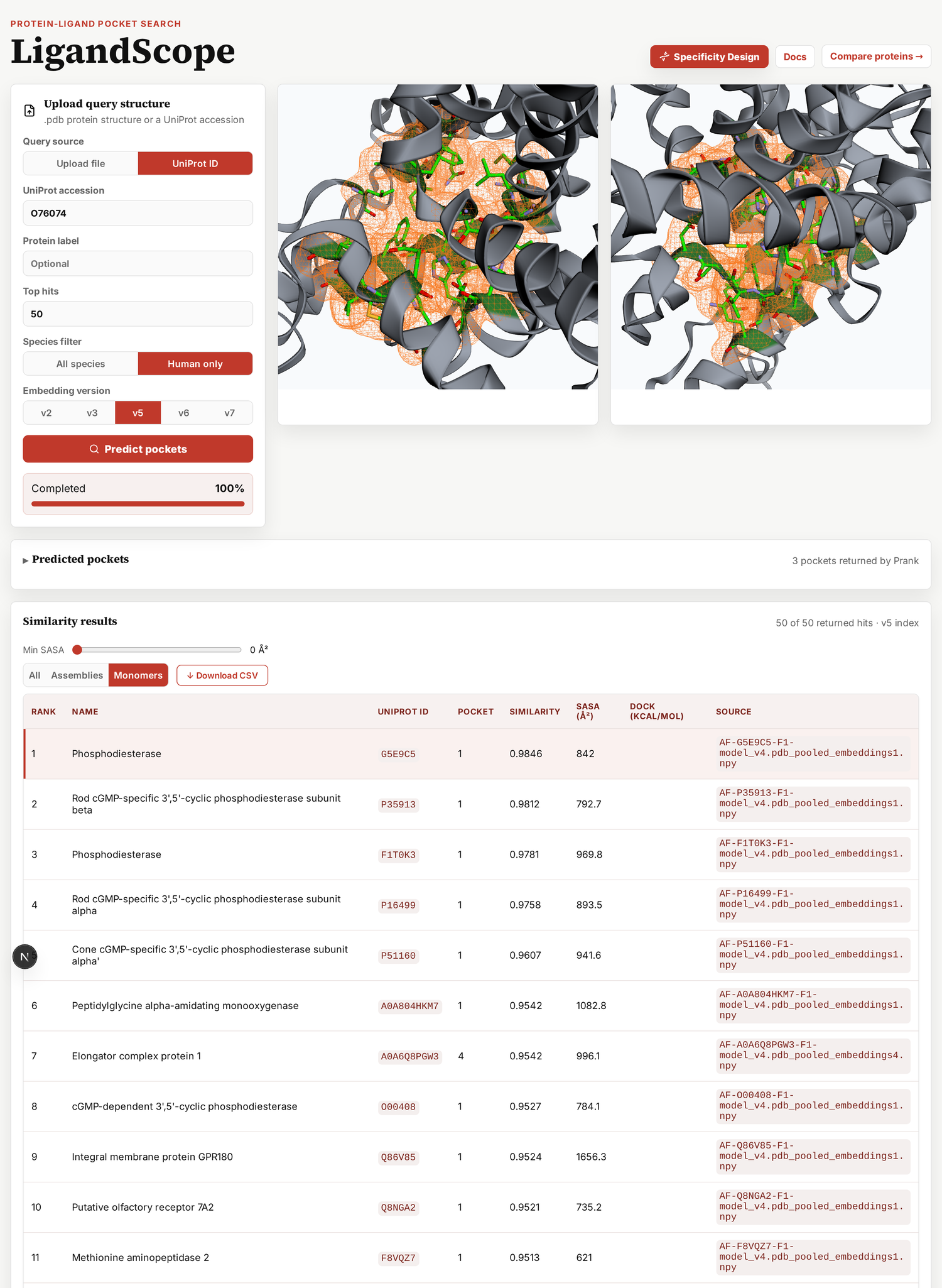
Start by giving PocketScope a protein. Choose Upload file (a.pdb or .cif) or UniProt ID (the AlphaFold model is fetched for you), then click Predict pockets. P2Rank returns ranked binding pockets; each row shows its probability, residue count, SASA, and center.
Select the pocket you care about (the radio button) — this is your on-targetpocket for everything that follows.
Off-target search
Click Search Using Pocket. PocketScope turns your pocket into its per-residue tensor and scores it against every one of the 153,805 cavities in the AlphaFold human proteome. The Similarity results table lists them by score — these look-alike pockets are your candidate off-targets: proteins a molecule for your target is most likely to hit by accident. Click any row to inspect it in the 3D viewer.
Search method. You can pick between two ways of scoring. Both are in the paper.
MaxSim is the method the paper reports. It compares the pockets one residue at a time. Each residue in your pocket finds its best partner in the other pocket. The score is the average of those matches.
Mean-pooled averages each pocket into a single vector first, then compares the two vectors. It is faster. It also loses track of which residue matched which, so the ranking is rougher. The paper uses it as the comparison case.
Example: searching the PDE5A active site surfaces PDE6A/PDE6B/PDE6C — exactly the retinal phosphodiesterases behind the blue-vision side effect of PDE5 inhibitors.
Specificity design
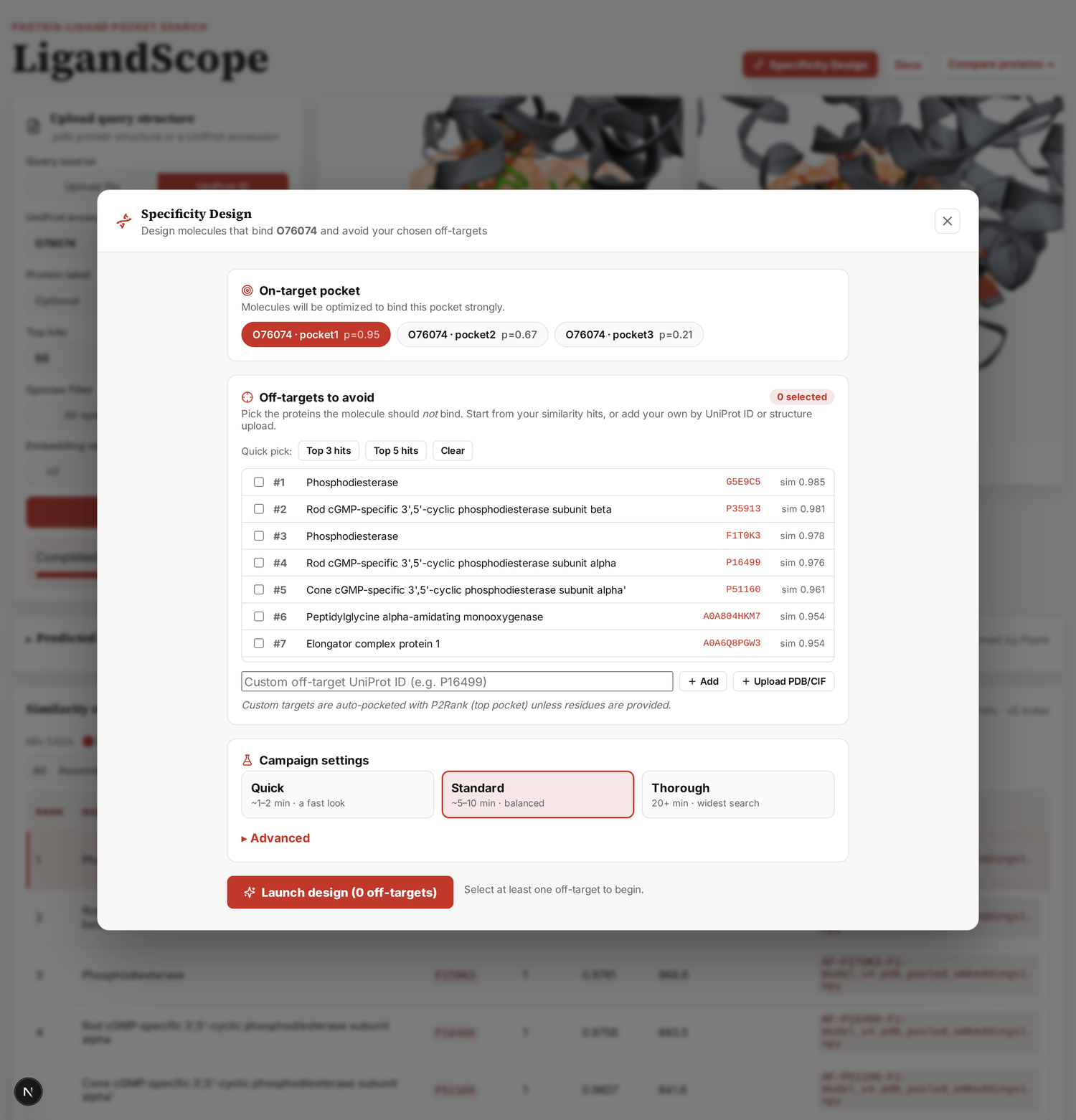
Click Specificity Design in the top bar to open the studio. This is where you turn "avoid these off-targets" into designed molecules.
1 · Choose targets
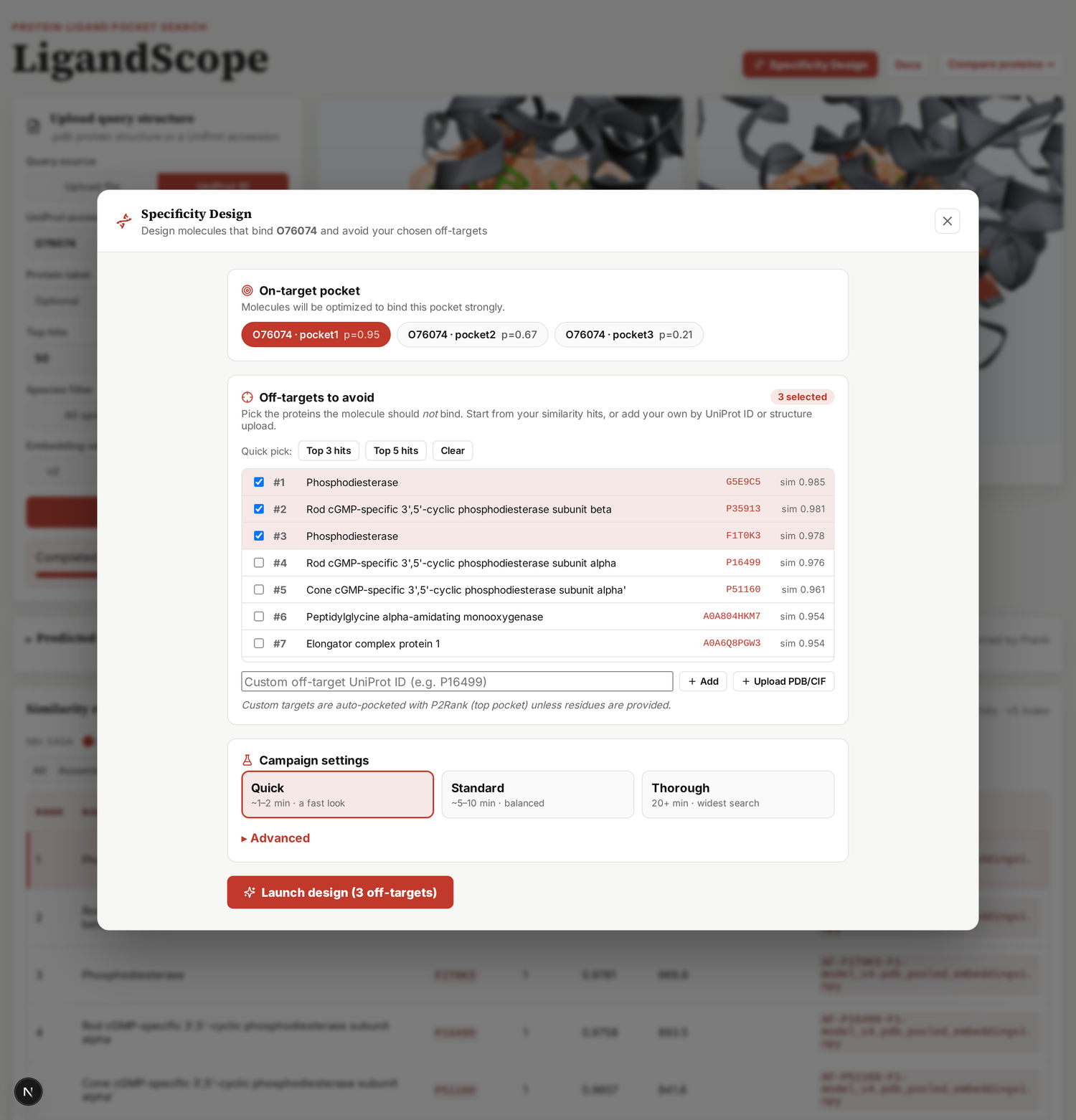
Confirm the on-target pocket, then pick the off-targets to design against — check them straight from your similarity hits, or add your own by UniProt ID or by uploading a structure (its pocket is auto-detected with P2Rank).
2 · Launch & watch it evolve
Pick a preset and hit Launch design. A CReM generative optimizer proposes molecules and scores each against your on-target and every off-target with GPU docking. The studio updates live: an optimization progress chart, a selectivity map (on-target vs worst off-target — points below the line are selective), and a grid of designed molecules with 2D structures, sortable by fitness, gap, on-target strength, or QED.
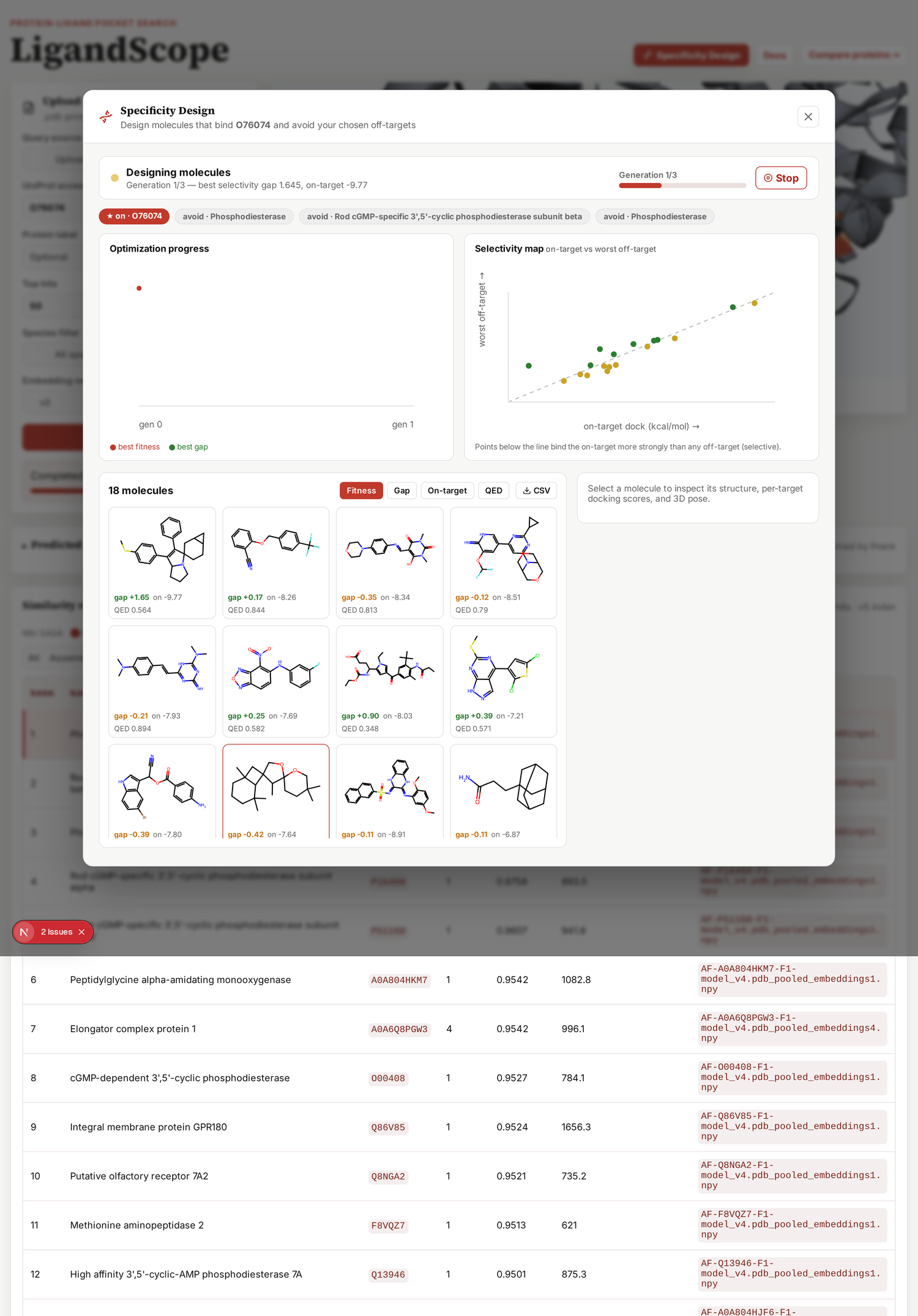
3 · Inspect a molecule
Click any molecule to see its 2D structure, the selectivity gap, per-target docking scores as bars, and the 3D docked pose in the on-target pocket. Export the whole set with CSV.
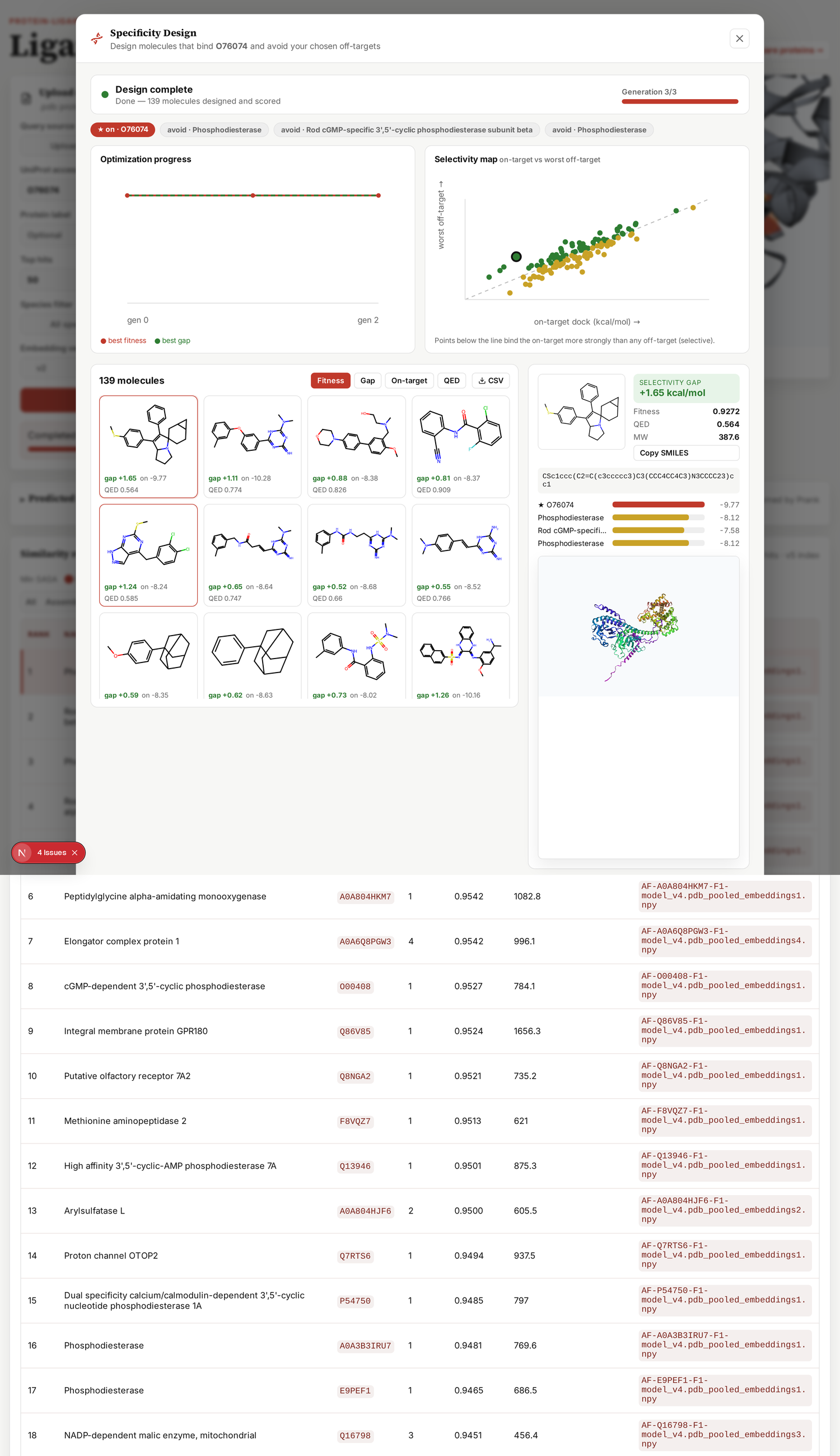
The gap is the docking-score difference (kcal/mol) between the closest off-target and the on-target. A positive gap means the molecule is predicted to prefer your target — that is the selectivity you are designing for.
Docking
You can dock a ligand of your own into your query pocket and its off-target pockets at once, to see whether the compound actually prefers the target you meant. The panel sits between the structure viewers and the results table, under Dock ligand into the target and off-target pockets. It appears once a similarity search has returned hits, since there are no off-target pockets to dock into before that.
Upload a ligand (.pdb/.pdbqt/.cif) or type a SMILES string or CCD code into the text box, set how many off-targets to include (up to 25), and press Run Docking.
Your own pocket is always docked first, as the on-target baseline. When the run finishes the panel reports that score, the best off-target score, and the margin between them: an off-target scoring below your target is the case worth looking at, and is called out in red. Every individual score also lands in the Dock column of the results table, which can be re-sorted by it.
Tick Show docked compound in the pocket viewers to draw the docked pose inside the pocket in both viewers; untick it to go back to the pocket residues alone. Selecting a different off-target row shows that pocket’s own pose. Scores CSVdownloads the table including the on-target row, and Poses + scores (.zip)downloads every docked pose as both .pdb and the native AutoDock.pdbqt, together with the same CSV.
Receptors are stripped to their polymer atoms before docking, so waters, buffer molecules and cofactors in an uploaded crystal structure are not part of the box. Docking runs on one CPU thread and jobs queue, so a busy moment makes a run slower rather than failing it. Vina scores track cavity size and are weak at ranking one target against another, so treat the margin as a hypothesis to follow up, not as a measurement of selectivity.
Command-line tool
The search on this site also runs on your own machine. The tool and the index are both published.
git clone https://github.com/Bhargava-Systems-Research-Inc/PocketScope
cd PocketScope
pip install -e .            # search only, needs numpy
pip install -e ".[gpu]"     # hold the index on a GPU, much faster
pip install -e ".[encode]"  # also encode new pockets (torch + esm)
There are three commands. search ranks the index against one pocket, encode saves a pocket as its tensor, and info summarises an index.
# what is in this index
pocketscope info --index pocket_index/

# rank the pocketome against pocket 1 of a structure
pocketscope search --index pocket_index/ \
                   --pdb protein.pdb \
                   --prank protein_predictions.csv \
                   --rank 1 --top-k 20 --exclude P24941

# or encode once and reuse the query
pocketscope encode --pdb protein.pdb --prank protein_predictions.csv --rank 1 --out query.npy
pocketscope search --index pocket_index/ --query query.npy
--pdb is a structure and --prank is the P2Rank prediction CSV for it. --rank picks which detected pocket to use as the query. --exclude drops one accession from the results, normally the query's own protein. --csv hits.csv writes the table instead of printing it. --device cpu searches without a GPU. --alpha and --n-max change the chemical-block weight and the residue cap, which you should leave alone to match the published index.
Download the index from Zenodoand point --index at the folder holding pocket_tensor.npy and pocket_index_rows.csv.
There is a Python interface too, if you would rather script it:
from pocketscope import PocketIndex, pocket_from_structure, encode_pocket
from pocketscope.encoder import embed_chain

pocket_seq, chain_seq, rows = pocket_from_structure("protein.pdb", "preds.csv", rank=1)
query = encode_pocket(pocket_seq, embed_chain(chain_seq)[rows])   # (L, 1165)

ix = PocketIndex("pocket_index/")
for hit in ix.search(query, top_k=10):
    print(hit["accession"], hit["score"])
The specificity design studio is not part of that tool. It runs here on the web server, where the docking backend lives.
How it works
A pocket is represented as an L × 1165 tensor: for each cavity-lining residue, 1152 dimensions of frozen ESM-C 600M (used exactly as released, nothing retrained) and 13 physicochemical channels. The two blocks are L2-normalised separately, the chemical block is scaled by alpha = 0.5, and the concatenation is renormalised, so every residue vector is unit-norm and a dot product between two of them is a cosine. Retrieval is exhaustive: the query is scored against the whole pocketome, with no approximate index in between. The index itself is published — (153805, 64, 1165) float16, 22.9 GB — alongside the paper.
The design engine is a CReM island optimizer scored by batched docking:
             on-target pocket ─┐
 structure ──▶ P2Rank box       ├─▶ dock (GPU) ─▶ selectivity reward =
 UniProt/  ──▶ AlphaFold+P2Rank ─┘                geo-mean( reverse_sigmoid(on)
 structures        ▲                                × Π sigmoid(off) × QED × MW )
                   │ CReM mutations (islands)              │
                   └──────────── select top ──────────────┘   × N generations
Each generation, every island's molecules are mutated with CReM, the whole generation is docked against all targets in one Uni-Dock batch per target, and the selectivity reward ranks them. Strong on-target binding scores high; strong off-target binding scores low; QED and molecular weight keep candidates drug-like. The best migrate between islands and seed the next round.
Citing PocketScope
If you use PocketScope, please cite the paper:
Mohan K. and Bhargava Y. Retrieval of binding sites across the AlphaFold human proteome using protein language model representations.
If you use the pocket index or the benchmark tables, please also cite the data record: Zenodo 10.5281/zenodo.22178549. The code is at github.com/Bhargava-Systems-Research-Inc/PocketScope, with a BibTeX block in the README.
Please cite the tools PocketScope is built on as well: ESM-C, P2Rank and AlphaFold for the search, and CReM, Uni-Dock, AutoDock Vina, Meeko and RDKit if you use the design studio.